Salary Slip · Small Employer · Cash-Paid Documentation
Salary Slip Generator
If your salary is paid in cash and your employer doesn't issue a slip, or you run a small business and need to issue real slips to your staff, this is the right tool. For income you actually receive — banks cross-check against bank statements, so the figures need to match. No signup, no email, no document data stored.
— No app to install · no sign-up · your document data stays in your browser.
In this section
Part of: Salary, Rent & Income-Tax Documents →
Guides for this document
Related generators
What this generates
- Monthly payslip with earnings + deductions + net pay
- Basic / HRA / special / allowances itemized
- PF (12% employee + employer) + ESI + professional tax
- TDS column with optional Form 26AS / Form 168 reference
- Section 192 read with Form 16 / Form 130 schema
Primary sources
Company & Employee Details
Who issues the slip and to whom — pay period at the bottom.
Exported a profile before? Load it to auto-fill your business details.
What you get with the paid version
| Typical free generator | hrareceipt | |
|---|---|---|
| Full earnings breakdown (Basic, HRA, allowances) | ✓ | ✓ |
| Statutory deductions (PF, ESI, PT, TDS) | ✓ | ✓ |
| English + Hindi interface | ✗ | ✓ |
| Section 192 TDS label (statute-anchored) | ✗ | ✓ |
| Form 16 reconciliation reference field | ✗ | ✓ |
We compared against the top-ranked free generators in each category. Row coverage is verified per page; we omit any claim we cannot back up.
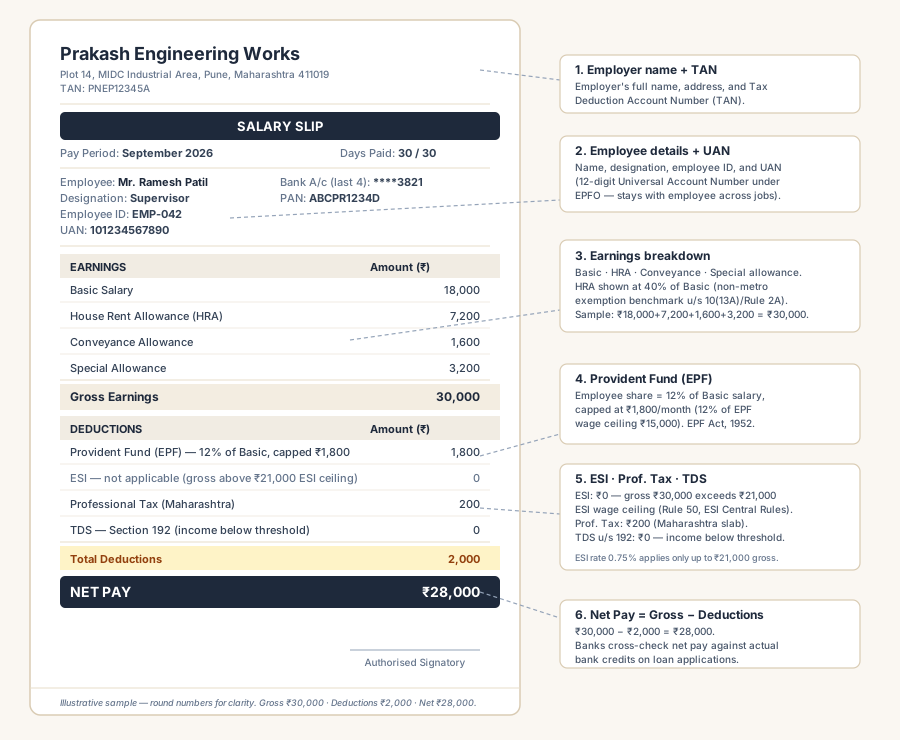
How to generate a salary slip
- Enter the employer name, address, and TAN. For EPFO/ESIC-registered employers, include the establishment code.
- Enter the employee name, designation, employee code, and UAN (12-digit Universal Account Number under EPFO).
- Set the pay period (April–March financial year). Fill earnings rows: basic, HRA, conveyance, special allowance, and other allowances.
- Enter statutory deductions: PF (12% of basic), ESI (0.75% of gross where applicable), professional tax (state-specific), and TDS under Section 192. Review the live on-page preview — proofread every figure. Pay ₹5 for the final, ready-to-submit PDF. No signup.
Your salary data is processed entirely in your browser — employee names, PAN, UAN, and salary figures never reach our servers. We do not store, log, or share your document data.
Employers deduct TDS on salary under the Income Tax Act, 1961, and remit PF and ESI contributions as applicable. Use this generator for actual salary paid — figures must match your bank credits. Salary slip ↔ Form 16 reconciliation explained
Using this slip for a loan application? See the dedicated guide →
FAQ
Salary slip — common questions
Are these salary slips accepted for home loan and personal loan applications?
Does the slip include UAN, PF, and ESI fields?
Can I use these slips for visa applications?
How is TDS calculated on the slip?
Can my company issue payslips through this tool?
References
After you generate
- PDF downloads to your device — re-use employee profile next month
- Bulk Excel upload available for HR teams (Bulk plan)
- For loan applications, see the Salary Slip for Loan checklist
First-timer questions
Is this accepted by banks for loan applications?
Yes — the format includes every field banks check (gross, deductions, net, PF/ESI, TDS). See the Salary Slip for Loan pillar guide for the lender-side checklist.
How is HRA shown?
HRA appears as a separate earnings line. The HRA exemption calculation is on the Tax Calculator, not the payslip.
Does this work for cash-paid salary?
Yes, but mark the mode of payment honestly. Banks cross-verify with bank credits during loan underwriting.
Can I generate Form 16 from this?
No — Form 16 (renumbered Form 130 from April 2026) is generated by the employer's TDS return software. The payslip + Form 130 should reconcile.
Last reviewed: 24 September 2026
For HR teams · Bulk plans
Generating multiple salary slips for your team?
A bulk plan unlocks credits across all five generators (GST invoices, payment receipts, salary slips, rent receipts, kaccha bills). Plans start from Rs.499 → 100 credits on a 45-day wallet. Once you have a code, you can either generate one document at a time on any generator page, or upload an Excel of up to 500 rows on /corporate-bulk to get a ZIP of clean PDFs in one shot. Excel parses entirely in your browser; no row data reaches our servers.